-
 English
-
 Español
-
 Català
-
 Français
English
Español
Català
Français
Drag-and-drop lesson scheduling for music teachers, tutors, speech therapists, and specialists. See your entire week at a glance and manage changes in seconds.
Free plan available with all core features • No credit card required
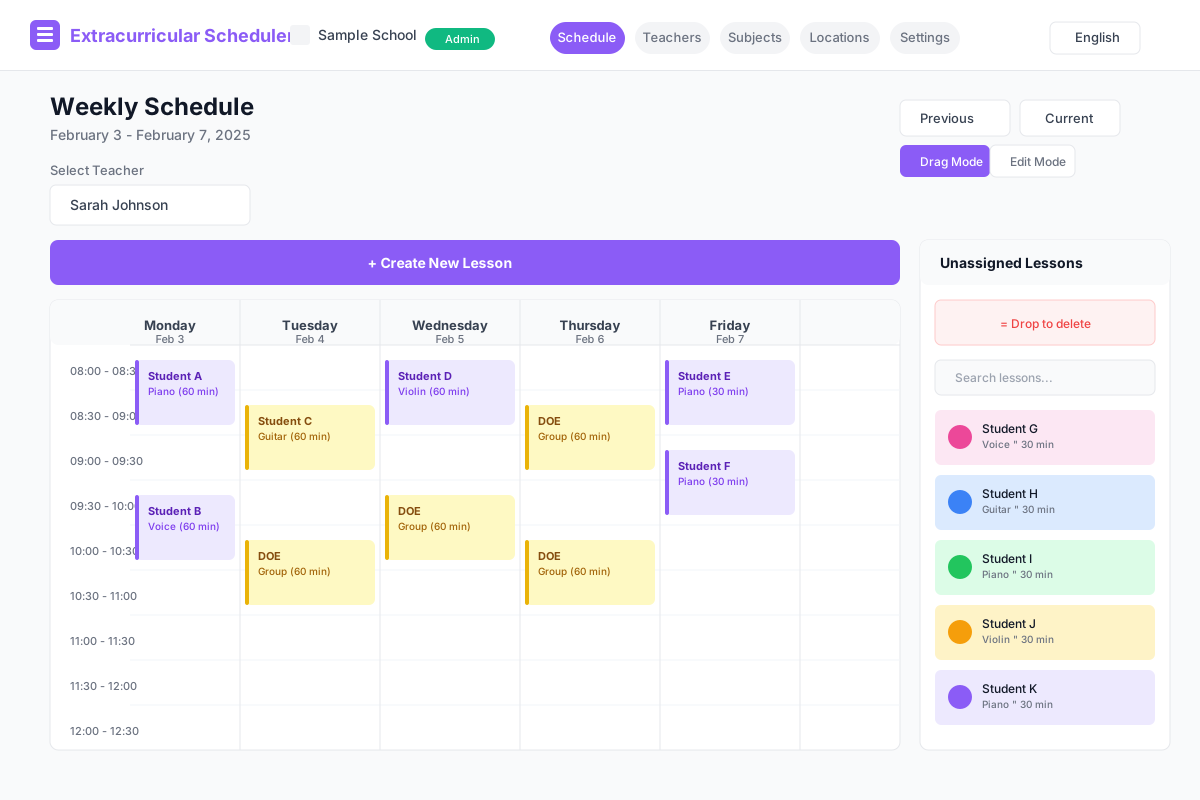
Managing extracurricular lessons shouldn't be this complicated
Complex Excel files that break when you move one lesson. Multiple versions floating around with no single source of truth.
Student absences, teacher changes, and schedule conflicts mean constant adjustments. Each change takes too long to process.
Coordinating schedules across multiple specialists, each with different availability and student loads.
Hard to see the big picture. Identifying gaps, conflicts, and unassigned lessons requires manual scanning.
Manually entering student information when you already have it in spreadsheets. Double work that wastes time.
Teachers need to check their schedules on the go, but spreadsheets are hard to read on mobile devices.
A visual scheduling tool designed specifically for extracurricular lessons, music classes, tutoring sessions, and specialist appointments.
Reschedule lessons by simply dragging them to a new time slot. Changes save automatically.
Each teacher sees their own schedule. Administrators see everyone. Role-based access keeps things simple.
Import student data from your existing spreadsheets. No manual re-entry required.
See all unassigned lessons in one place. Drag them onto the calendar when you're ready.
From signup to your first scheduled week in under 15 minutes
Add your teachers and the subjects they teach. Define locations if lessons happen in different rooms.
Import student data from Google Sheets or create lessons manually. Lessons appear in your unassigned queue.
Drag lessons from the queue onto your weekly calendar. Rearrange anytime with a simple drag.
Get your scheduling organized with our free plan. Upgrade only when you need more capacity.
Stop wrestling with spreadsheets. Start managing your schedule visually.
Start Free NowNo credit card required • Free plan forever • Upgrade when ready
